When a smart home system stops working, customers expect a fast response — not a message lost in a chat thread. Our WhatsApp Support Ticket Automation instantly converts every customer issue into a tracked ticket, routes it to the right technician, and keeps the customer informed until it’s resolved.
The WhatsApp Support Ticket Automation makes sure no customer issue ever falls through the cracks just because it came in as a casual message. The moment a customer reports a problem — a smart lock not connecting, a security camera offline, or an automation hub malfunctioning — the system automatically creates a structured support ticket, capturing the issue details, device type, and urgency level directly from the conversation.
Smart home systems are deeply personal — when a security camera goes offline or a smart lock stops responding, customers feel it immediately and expect a fast, organized response. If their WhatsApp message gets buried in a busy inbox with no tracking, no ticket number, and no clear ownership, that customer starts to question whether they made the right investment in your smart home system at all.
WhatsApp Support Ticket Automation eliminates that risk entirely. Every issue becomes a trackable, accountable ticket the moment it’s reported, so your team resolves problems faster and your customers stay confident in the system they trusted you to install.
A customer messages your WhatsApp support number because their smart thermostat stopped responding. The message gets buried under twenty other conversations, no one is assigned to it, and three days later the customer is still without a working thermostat and starting to regret the installation.
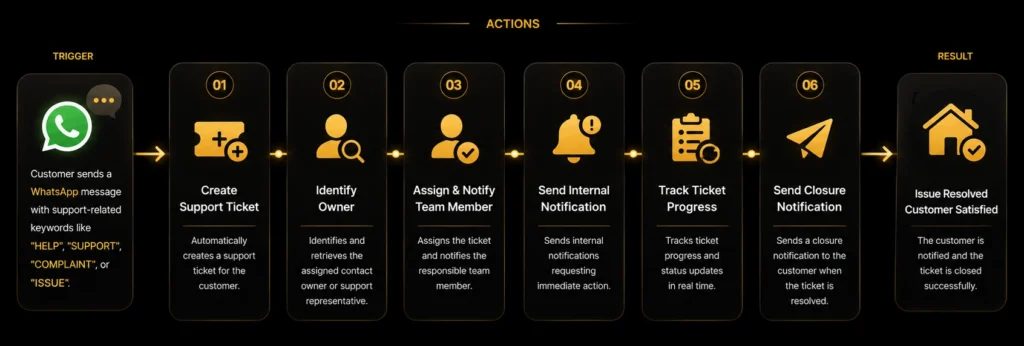
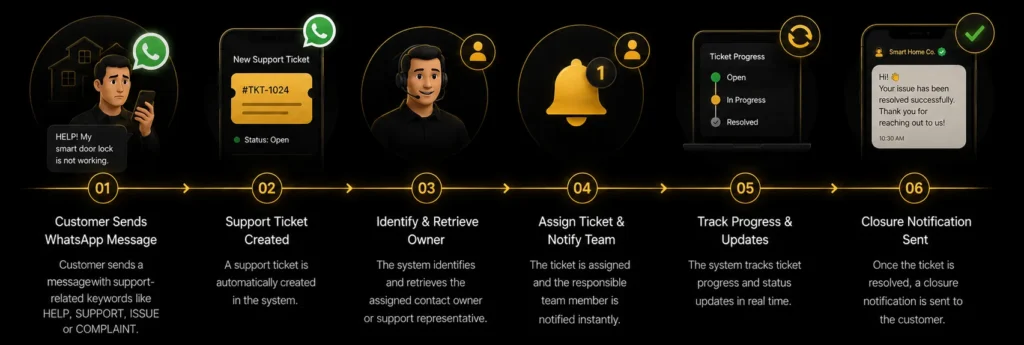
The moment a customer sends a WhatsApp message with keywords like “HELP,” “SUPPORT,” or “COMPLAINT,” the system automatically creates a support ticket and identifies the assigned contact owner or support rep. The ticket is instantly routed to the right team member, along with an internal notification requesting immediate action.
The moment a customer reports an issue via WhatsApp, six things happen automatically — turning a casual message into a fully tracked support resolution.
Customer reports an issue through your WhatsApp business number.
System automatically generates a structured support ticket.
Device type and urgency level are identified from the conversation.
Ticket is routed to the technician best suited for that system.
Automated message confirms the issue is being addressed.
Ticket status updates until the issue is fully resolved.
WhatsApp Support Ticket Automation brings structure and accountability to a channel that’s often informal and easy to lose track of. By converting every message into a trackable ticket and routing it intelligently, your business resolves issues faster, keeps customers reassured throughout the process, and protects the trust customers placed in your installation.
Every WhatsApp message becomes a tracked ticket with clear ownership and status.
Automatic routing connects each issue directly to the right specialist immediately.
Instant confirmation and progress updates prevent anxious follow-up messages.
Past tickets give technicians valuable context for diagnosing recurring problems.
Follow the complete journey from a single support message to a resolved, closed-out ticket. See how WhatsApp, your CRM, and your support team structure work together to catch every issue and route it instantly.
WhatsApp Business integration connected, so support keywords are detected the moment a message comes in.
Your support team structure and CRM user assignments, so tickets are routed to the right rep automatically.
Your notification setup, so assigned reps are alerted immediately and can act without delay.
CRM access for ticket status tracking, so progress is visible from creation through resolution.
See how every support request is handled automatically through WhatsApp. From the moment a customer reports an issue, the system creates a support ticket, assigns it to the right team member, tracks progress, and keeps the customer informed until the issue is fully resolved—delivering faster response times and a better support experience.
Yes. The system identifies urgency signals, such as a security system being offline, and flags those tickets for immediate priority handling ahead of general questions or minor requests.
Yes. The customer receives an automatic confirmation message immediately after their issue is reported, and receives progress updates if resolution takes longer than the expected timeframe.
Yes. Every ticket is linked to the customer's record, giving technicians visibility into past issues and resolutions, which helps diagnose recurring problems more efficiently.
Yes. The automation can sync ticket data with your existing helpdesk or CRM system, ensuring support history stays consistent across every tool your team uses.
The automation classifies the issue based on the smart home system involved — such as security, lighting, or climate control — and routes the ticket to technicians configured as specialists in that category.
A malfunctioning smart device can mean a frustrated customer fast. This automation
detects support keywords, creates a ticket instantly, and alerts the right
technician — closing the loop the moment the issue's fixed.