Nobody wants to scroll through old messages trying to remember how to book a service call or check a warranty. Our WhatsApp Quick Access Menu gives your smart home customers a clean, instant menu the moment they message — so they get to the right place fast, without your team lifting a finger.
The WhatsApp Quick Access Menu transforms your business number into a 24/7 self-service hub for your smart home customers. The moment someone messages in — whether they’re a new customer asking about services or an existing client needing post-installation support — they’re greeted with a clean, numbered menu that puts every option at their fingertips.
The customers who invest in smart home technology are exactly the type of people who want fast, frictionless, self-directed service. They don’t want to wait on hold or send an email and wait 24 hours for a reply — they want answers now, delivered through the app they’re already using.
A WhatsApp Quick Access Menu meets that expectation perfectly. It positions your smart home installation business as tech-forward, professional, and effortlessly accessible — qualities that reinforce the trust your customers placed in you when they chose your systems for their home.
A customer who had their smart home system installed three months ago wants to book a follow-up maintenance visit. They message your WhatsApp number, wait two hours for a reply, and by then have already called your office and left a slightly frustrated voicemail.
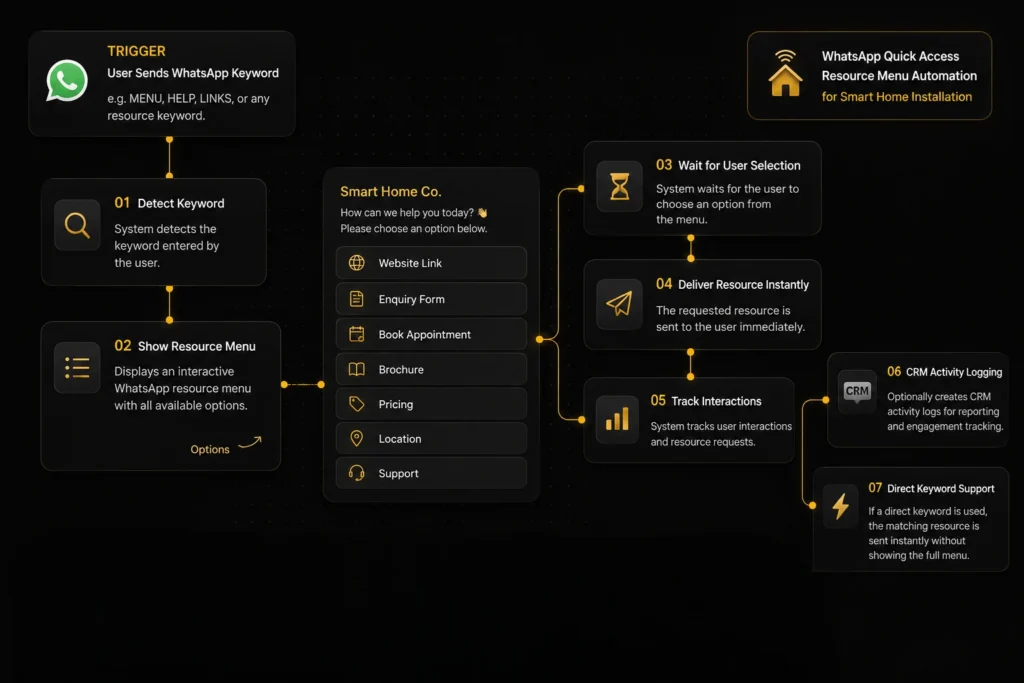
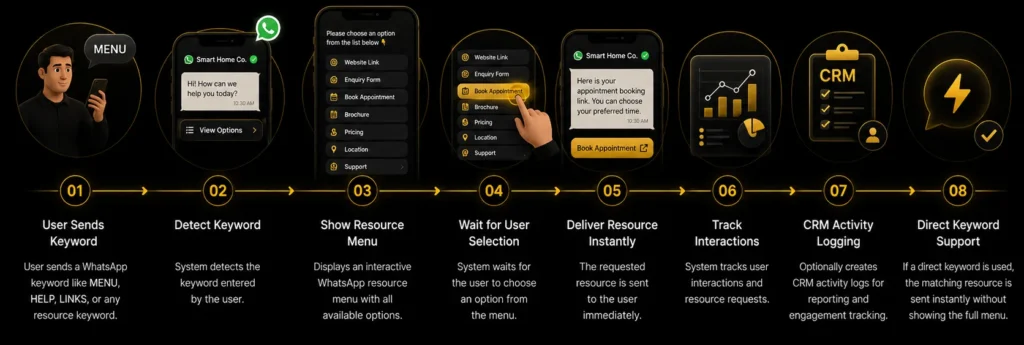
The moment a user sends a WhatsApp keyword like MENU, HELP, or LINKS, the system instantly detects the request and displays an interactive resource menu—covering everything from your website and enquiry form to appointment booking, brochures, pricing, location, and support.
The moment a customer sends any message to your WhatsApp number, six things happen automatically — giving them instant access to every service they need without waiting for a manual reply.
Customer messages your WhatsApp business number.
Instant numbered menu is sent with all available options.
Customer replies with their choice number.
System routes to the correct response, booking, or team.
Appointment booked, ticket created, or information shared.
Relevant team member alerted if human follow-up is needed.
WhatsApp Quick Access Menu positions your business as the kind of tech-forward, effortlessly accessible company that smart home customers expect. By giving customers instant self-service access to bookings, support, and information, your team handles fewer repetitive inbound messages while customers get faster, better experiences around the clock.
The menu handles common requests instantly, even when your office is closed.
Bookings, status checks, and warranty requests are handled automatically without typing a single response.
Support emergencies are flagged and escalated automatically, ensuring critical problems never wait in a queue.
Visitors can go from question to booked appointment in a single conversation.
Follow the complete journey from a single WhatsApp message to instant, self-serve resource delivery. See how your integrations, links, and forms work together to answer common questions without anyone on your team lifting a finger.
WhatsApp Business Integration and CRM access, so messages can be received, tracked, and logged automatically.
Your website, brochure, pricing, and location links, so the menu always delivers accurate, up-to-date information.
Your enquiry form and booking page, so users can take action immediately after getting the info they need.
Your support contact information, so users who need a human are routed there instantly.
See how customers quickly find the information they need through WhatsApp. From sending a simple keyword to instantly accessing brochures, pricing, booking links, support, or your website, the automation delivers the right resource in seconds while tracking every interaction inside your CRM for a faster, more convenient customer experience.
Yes. Every menu option, response message, and routing rule is fully customizable to reflect your specific services, product lines, and team structure — making the experience feel native to your business.
The system can be configured to recognize common keywords and phrases, routing the customer appropriately even if they type naturally instead of selecting a numbered option.
Yes. The automation can identify whether an inbound message is from a known customer in your CRM and display a tailored menu — offering existing customers direct access to support and status, while new contacts are guided toward consultations and service information.
Yes. The quick access menu operates 24/7, allowing customers to self-serve at any time.
Yes. Every menu selection, conversation, and customer action is automatically logged in your CRM in real time, giving your team full visibility into what customers are asking and how they're interacting with your WhatsApp channel.
Give customers instant access to pricing, brochures, booking links, support, and
more through WhatsApp—delivering the right resource in seconds
while reducing manual responses and improving the customer experience.