Project Intake & Creation Automation

From Signed Deal to Active Project — Without the Paperwork Chaos

A signed contract should never sit in someone’s inbox waiting to become a real project. Our Project Intake & Creation Automation instantly turns every closed deal into a fully organized project — folders, schedules, teams, and client communication, all set up automatically the moment the deal is won.

Stop losing days to manual project setup — launch every job the moment it's won

The Project Intake & Creation Automation eliminates the gap between “deal closed” and “project actually started.” The instant a contract is signed or an opportunity moves to won, the system automatically creates a new project record, pulls in all the customer and scope details from the sales process, and sets up the folders, checklists, and timelines your team needs to get to work.

Why it matters: The first week after closing sets the tone for the entire project

For general contractors, the days right after a deal closes are critical. Customers are excited and want to see momentum — but that’s also exactly when manual handoffs between sales and operations cause the most delays. A project that sits idle for a week because no one created the folder, assigned a PM, or scheduled the kickoff call sends the wrong message before work has even begun.

Project Intake & Creation Automation closes that gap completely. Every won deal becomes an active, organized project within minutes — not days — so your team starts strong and your customer feels confident from day one.

The Problem

A deal closes on Friday afternoon. The salesperson moves on to the next lead. By Wednesday, no project folder exists, no PM has been assigned, and the customer is calling to ask why nothing has happened yet.

The Solution: Turn every closed deal into an organized project instantly

Project record is created automatically the moment a deal is marked as won

Customer and scope details are pulled directly from the sales record — no re-entry

Project manager is assigned automatically based on project type or current workload

Kickoff checklist and timeline are generated instantly using your standard templates

Customer receives an automated welcome message confirming next steps right away

One Trigger. Eight Intelligent Actions.

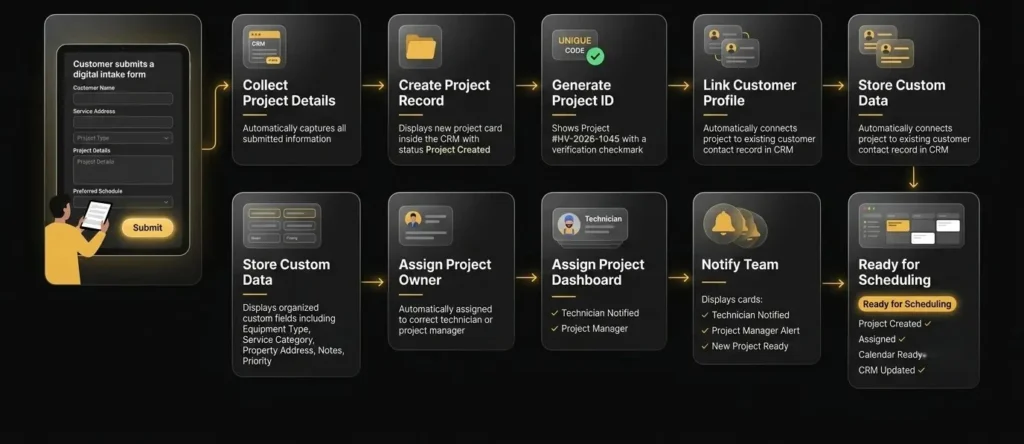
The moment a customer submits a project intake form, the system instantly collects all project details, creates a new project record in your CRM, and generates a unique project ID. It links the project to the right customer contact, stores every detail in custom fields, assigns ownership, and notifies the assigned technician or project manager—making the data instantly available for scheduling, reporting, and operations, without any manual entry.

An infographic detailing a 12-step "Project Intake & Creation Automation" workflow

Our process​​

How It Works

The moment a deal is marked as won, six things happen automatically — turning a signed contract into an active, organized project within minutes.

Deal Marked Won

Sales rep or CRM updates the opportunity status to closed-won.

regular_file-pdf

Project Created

New project record is generated with all relevant details pulled in.

PM Assigned

Project manager is matched automatically based on type or workload.

hugeicons_appointment-02 icon

Kickoff Scheduled

Standard kickoff tasks and timeline are created automatically.

Team Notified

Assigned PM and relevant team members are alerted instantly.

fluent-mdl2_team-favorite icon

Customer Welcomed

Automated message sent confirming next steps and timeline.

Business Benefits

Why Businesses Use This Automation

Project Intake & Creation Automation closes the gap between sales and operations, ensuring every closed deal becomes an active project immediately. By automating setup, assignment, and customer communication, your business starts projects faster, reduces internal confusion, and gives every customer a confident first impression.

Launch projects within minutes, not days

Every closed deal instantly becomes a fully set-up project ready for your team to execute.

Eliminate manual handoff errors

Project details flow automatically from sales to operations with zero re-entry or missed information.

Match the right PM to every job

Projects are assigned based on type and workload, ensuring balanced capacity across your team.

Impress customers from day one

Automated welcome communication keeps customers informed and confident immediately after signing.

Requirements​

What we need from you

Follow the complete journey from form submission to a fully created project. See how custom objects, intake forms, and assignment rules work together to turn every submission into an organized, ready-to-work project.

Setup time: 2–5 hours depending on communication channels, pipeline structure, and assignment rules.

Customer Journey

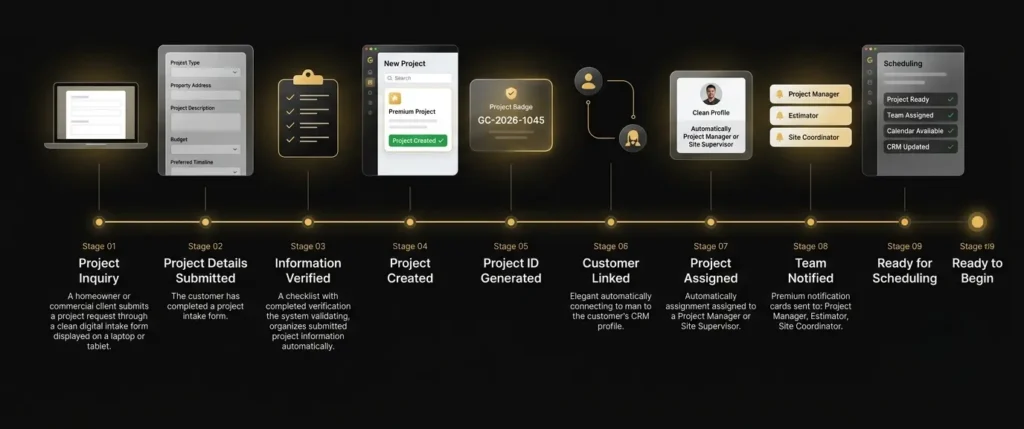
From Project Request to Ready-to-Manage Project

See how every new project request is transformed into a fully organized project inside your CRM. From capturing customer requirements and generating a unique project ID to assigning the right project manager and preparing the job for scheduling, every step is automated to ensure a faster, more accurate project kickoff.

SaaS customer journey timeline infographic for "Project Intake & Creation Automation" on a matte black background

Need Help? We’ve Got Answers

The automation reads directly from your CRM or sales opportunity record, pulling customer information, scope of work, pricing, and any notes captured during the sales process into the new project record automatically.

Yes. PM assignment rules are fully customizable — you can route projects based on project type, geographic region, team workload, or specific PM specializations.

Yes. The automation can apply different templates, checklists, and routing rules depending on whether the project is residential or commercial, ensuring each gets the appropriate setup process.

If a new project hasn't been fully set up within your defined time window, the system automatically alerts a manager so the delay can be addressed before it affects the customer experience.

Yes. The automated customer welcome communication can be fully branded and customized to include project timelines, what to expect next, and key contact information specific to your business.

Turn Every New Job Into an
Organized Project —
Automatically

Every intake form your clients submit becomes a fully organized project in your CRM
instantly — job ID, contact links, custom fields, and team notifications,
all handled automatically